DYSEKT docs · Chords and arp
Arpeggiator
Hold a key and hear it move. The ARP tab plays the chords of a scale, or of a progression, as patterns locked to your DAW's grid.
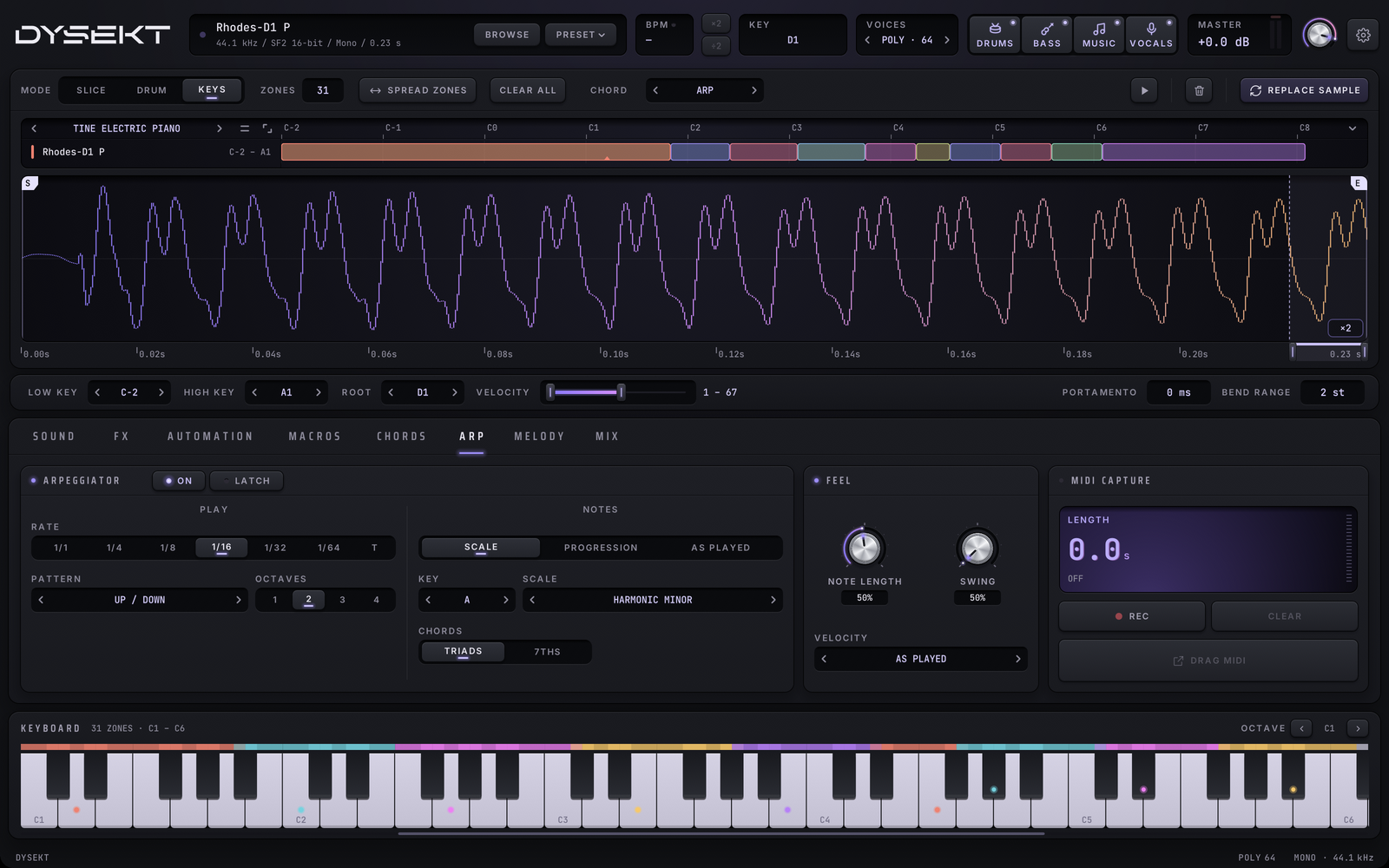
The arpeggiator works in Keys mode. Turn it on with ARP on the CHORDS selector, or with the switch on the ARP tab. Turning the arp on turns chord memory and progressions off, and the other way round.
#Where the notes come from
NOTES chooses the source:
- SCALE: choose a key and a scale with KEY & SCALE. Each key you hold plays its chord from that scale. A key outside the scale plays the chord of the scale note just below, so you can't hit a wrong one. For example, in A harmonic minor, E plays E–G#–B.
- PROGRESSION: each progression key plays its chord as an arpeggio, lit and numbered on the keyboard. The arrows and list work as on the CHORDS tab, and TRANSPOSE is shared with it. Drag it; right-click for 0.
- AS PLAYED: the notes you hold, exactly as you play them. Play a chord on your keyboard and it's arpeggiated as it is: no scale, no added notes.
CHORDS chooses three-note chords (triads) or four, with the 7th.
There are twelve scales, from major and the minors to the modes, pentatonics and blues.
#Play settings
| Control | What it does |
|---|---|
| PATTERN | UP, DOWN, UP / DOWN (top and bottom notes once), UP / DOWN + (twice), RANDOM, and KEY ORDER (the keys in the order you pressed them). |
| RATE | The step length, from 1/1 to 1/64. T plays triplets. |
| OCTAVES | Repeats the notes in up to 4 octaves. |
| LATCH | Keeps playing after you let go. The next keys you press start a new pattern. |
#Feel
| Control | What it does |
|---|---|
| NOTE LENGTH | How long each note lasts, as a share of the step, from 5% to 100%. Right-click or double-click for 50%. |
| SWING | Pushes every second step late, from 50% (straight) to 75%. Right-click or double-click for 50%. |
| VELOCITY | AS PLAYED: your key velocity. FIXED: always 100. ACCENT: 127 on each beat, 80 on the steps between. With your DAW playing, the beats are the song's; stopped, the first step is the beat. |
Double-click a knob's value to type it.
#Locked to your DAW's grid
While your DAW is playing, every step lands on its grid. Press a key a hair late and it still starts on time. When the DAW is stopped, the arp runs from the moment you press a key.
#Record and automate
- MIDI capture records the arpeggio, so you can drag it onto a track. See MIDI capture.
- Every ARP setting is a host parameter, so you can automate it from your DAW.