DYSEKT docs · Shaping sound
Effects
Sixteen effect types in a chain on every slice, pad or zone, and a master chain on the instrument's output.
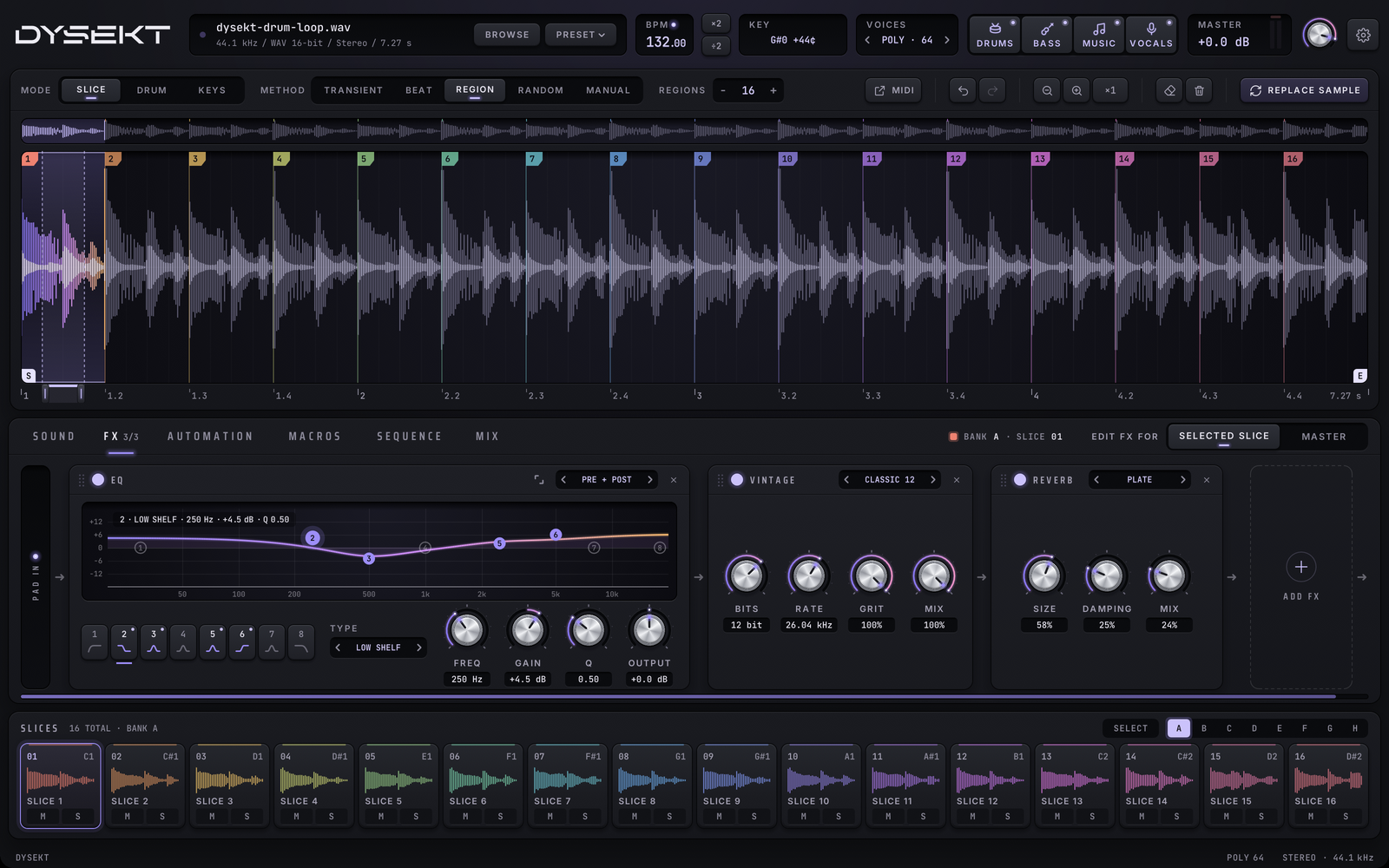
#Slice chains and the master chain
The FX tab edits a chain of effects. APPLY TO chooses which one:
- SELECTED SLICE (or pad, or zone): the selected one's own chain.
- MASTER: the chain on the instrument's output, after every slice.
Sound flows from INPUT on the left, through each effect in order, to OUTPUT.
#Build a chain
- ADD FX opens the effect chooser: categories on the left, the effects as tiles. Click an effect to add it to the end of the chain. Effects already in the chain are dimmed and marked IN CHAIN.
- Type while the chooser is open to search; Return adds the first match, Esc closes it.
- Drag a device's header to reorder the chain.
- The power key switches an effect off without taking it out of the chain.
- The remove key takes it out.
- Scroll a long chain by dragging it, or with the mouse wheel.
#Adjust an effect
- Drag a knob to adjust it. Shift-drag for fine steps.
- Double-click a knob to reset it.
- Double-click a knob's value to type a number.
- Presets: on effects that have them, the arrows step through presets; click the name for the list.
#The effects
#Filter and EQ
| Effect | What it does | Controls |
|---|---|---|
| FILTER | Bipolar low- or high-pass filter | FILTER, RESO |
| EQ | Eight-band EQ with a live analyser. See The EQ | FREQ, GAIN, Q, OUTPUT for the selected band |
| AUTO FILTER | Tempo-synced filter sweep | CUTOFF, RESO |
#Character
| Effect | What it does | Controls |
|---|---|---|
| DRIVE | Warm overdrive with tone | AMOUNT, TONE, MIX |
| SATURATOR | Soft analogue saturation | IN TRIM, OUTPUT |
| VINTAGE | Classic sampler emulation. GRIT is the SP-1200 trick: sampled fast, played back down, for aliasing grit at the same pitch. Presets include CLASSIC 12, CRUNCH 8 and DUSTY. | BITS, RATE, GRIT, MIX |
| TAPE STOP | Slows the tape to a halt | SPEED, MIX |
#Modulation
| Effect | What it does | Controls |
|---|---|---|
| CHORUS | Classic stereo chorus. Presets: SUBTLE, WIDE, ENSEMBLE. | RATE, DEPTH, MIX |
| PHASER · FLANGER | Swept phase with feedback. Presets for gentle, deep and fast phasing, and subtle, jet and metallic flanging. | RATE, DEPTH, FEEDBACK, MIX |
| AUTO PAN | Tempo-synced panning | RANGE |
#Space
| Effect | What it does | Controls |
|---|---|---|
| DELAY | Stereo delay with ping-pong. The time is a synced division from 1/16 to 1 bar; switch sync off for a free time. | TIME, FEEDBACK, PING-PONG, MIX |
| REVERB | Room, hall and plate. Presets: ROOM, HALL, PLATE, AMBIENCE. | SIZE, DAMPING, MIX |
| STEREO SPREAD | Widens only above a frequency, so the lows stay centred. FULL widens everything. | WIDTH, SPREAD ABOVE |
#Dynamics
| Effect | What it does | Controls |
|---|---|---|
| NOISE GATE | Cuts bleed below a threshold. Its meter shows the level going in; the line is the threshold, and the bar dims while the gate is closed. | THRESHOLD, RANGE, ATTACK, HOLD, RELEASE |
| COMPRESSOR | Punchy feed-forward compressor with a gain-reduction meter. Presets: GENTLE, PUNCH, GLUE. | THRESHOLD, RATIO, ATTACK, RELEASE, MAKEUP |
| LIMITER | Brick-wall ceiling. GAIN pushes the sound into the ceiling: louder and denser, and peaks never pass CEILING. | GAIN, CEILING, RELEASE |
#The EQ
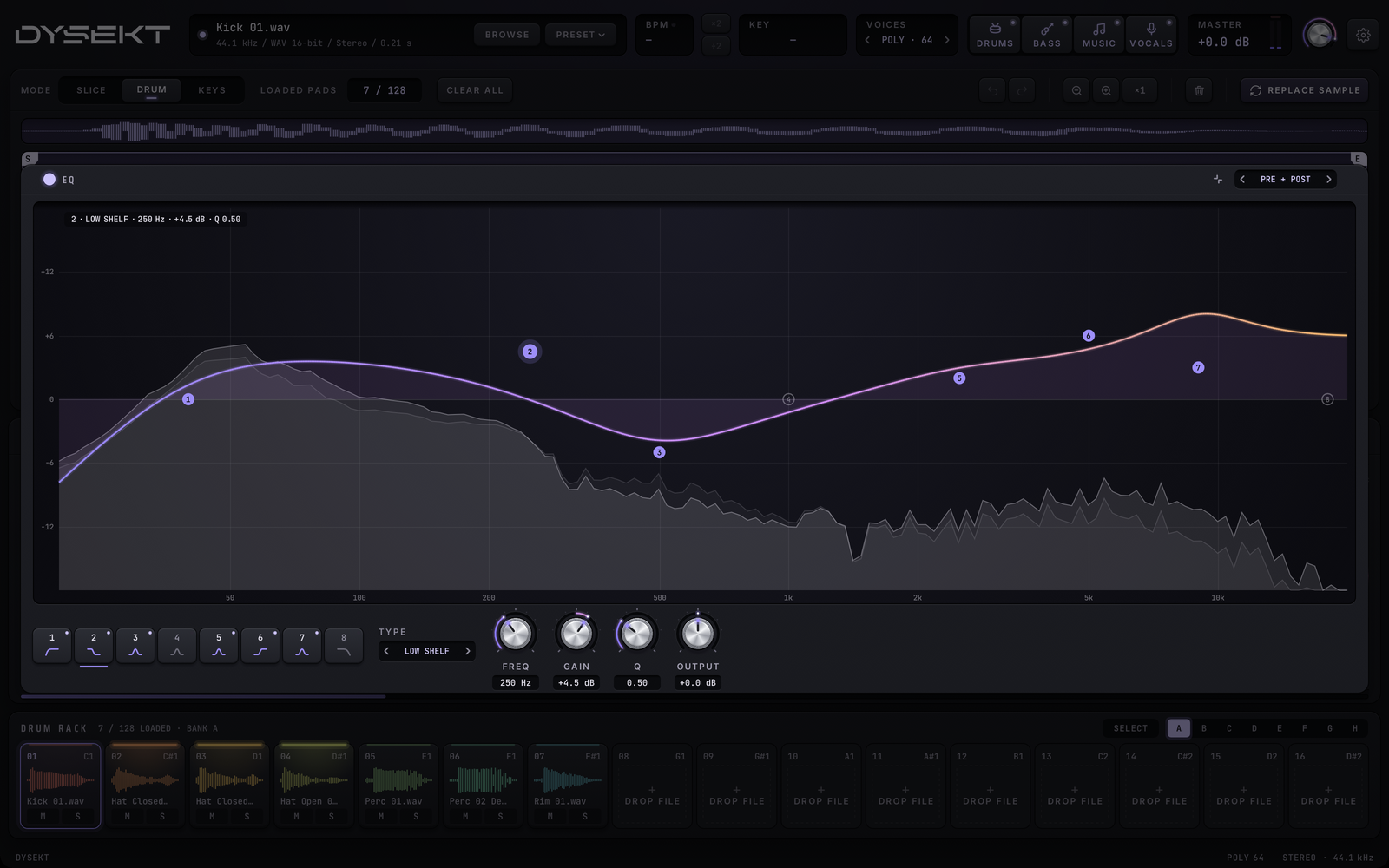
The EQ has eight bands. Each can be a LOW CUT, LOW SHELF, BELL, NOTCH, HIGH SHELF or HIGH CUT, with up to ±18 dB.
- On the graph: drag a numbered dot to set its frequency (left and right) and gain (up and down). Scroll over a dot to change its width (Q). Double-click a dot to switch the band on or off. Click empty space to bring in the nearest unused band there. Right-click a dot to set its gain to 0 dB.
- Band keys 1 to 8: click to select a band; click the selected band again to switch it on or off; right-click to reset it.
- TYPE, FREQ, GAIN and Q set the selected band. OUTPUT sets the EQ's level. Double-click a value to type it.
- ANALYSER draws the sound behind the curve: PRE + POST shows it before the EQ (faint) and after it, POST after only, or OFF.
- The expand key opens the EQ full size over the deck. Click it again, or click outside, to close it.
Every band's frequency, gain and Q can be automated and assigned to macros.
Older projects: an EQ saved before 1.2 plays exactly as it did, shown as CLASSIC, with its four bands. It becomes an 8-band EQ as soon as you change anything other than those four gains.
#Effects and stems
Effects come after the stems in each slice's sound, so a reverb on a vocals-only slice treats just the vocals. See Stems.